419-01B-2
Anti-Theft - Passive
419-01B-2
DESCRIPTION AND OPERATION
Anti-Theft - Passive
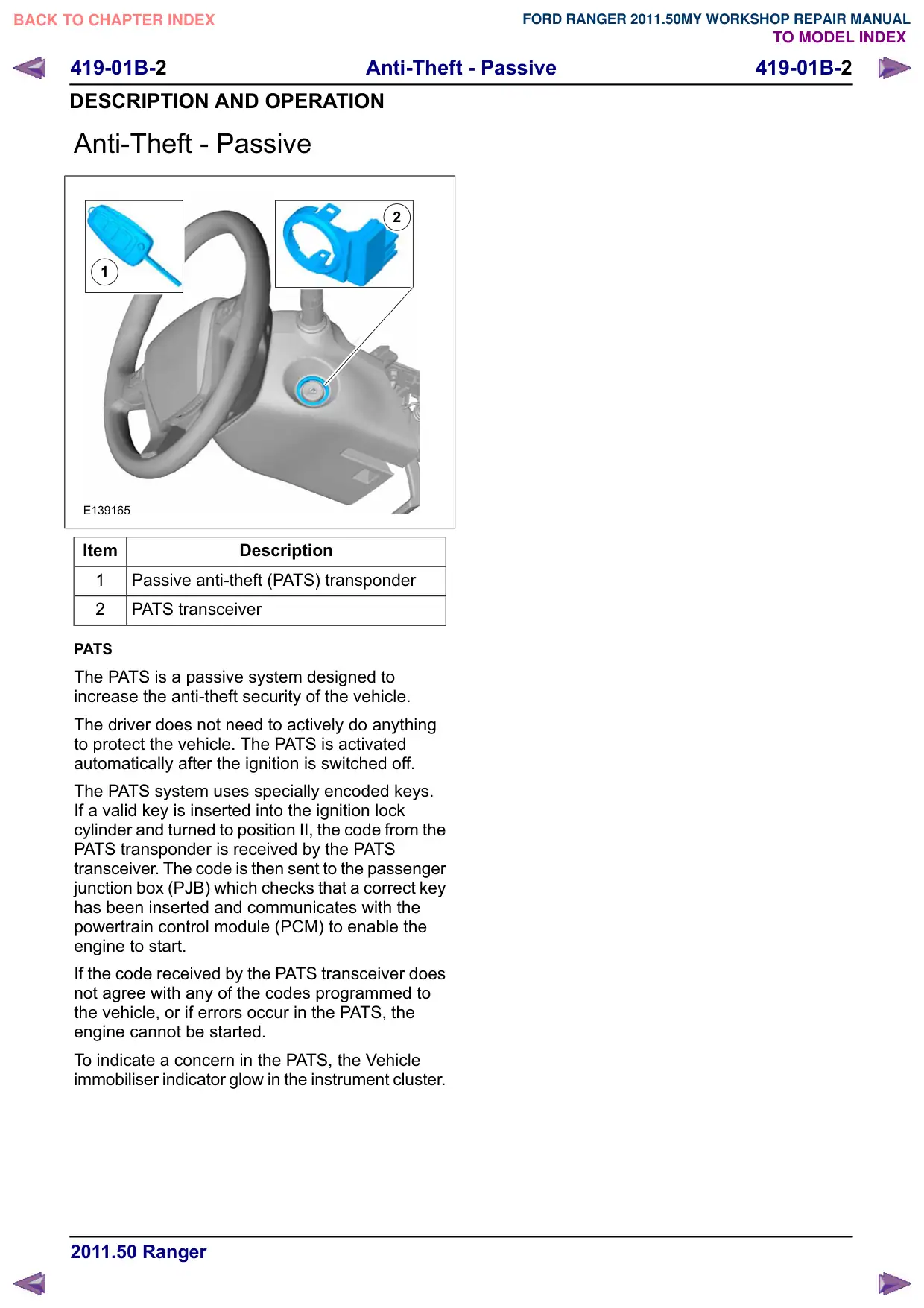
2
1
E139165
Item
Description
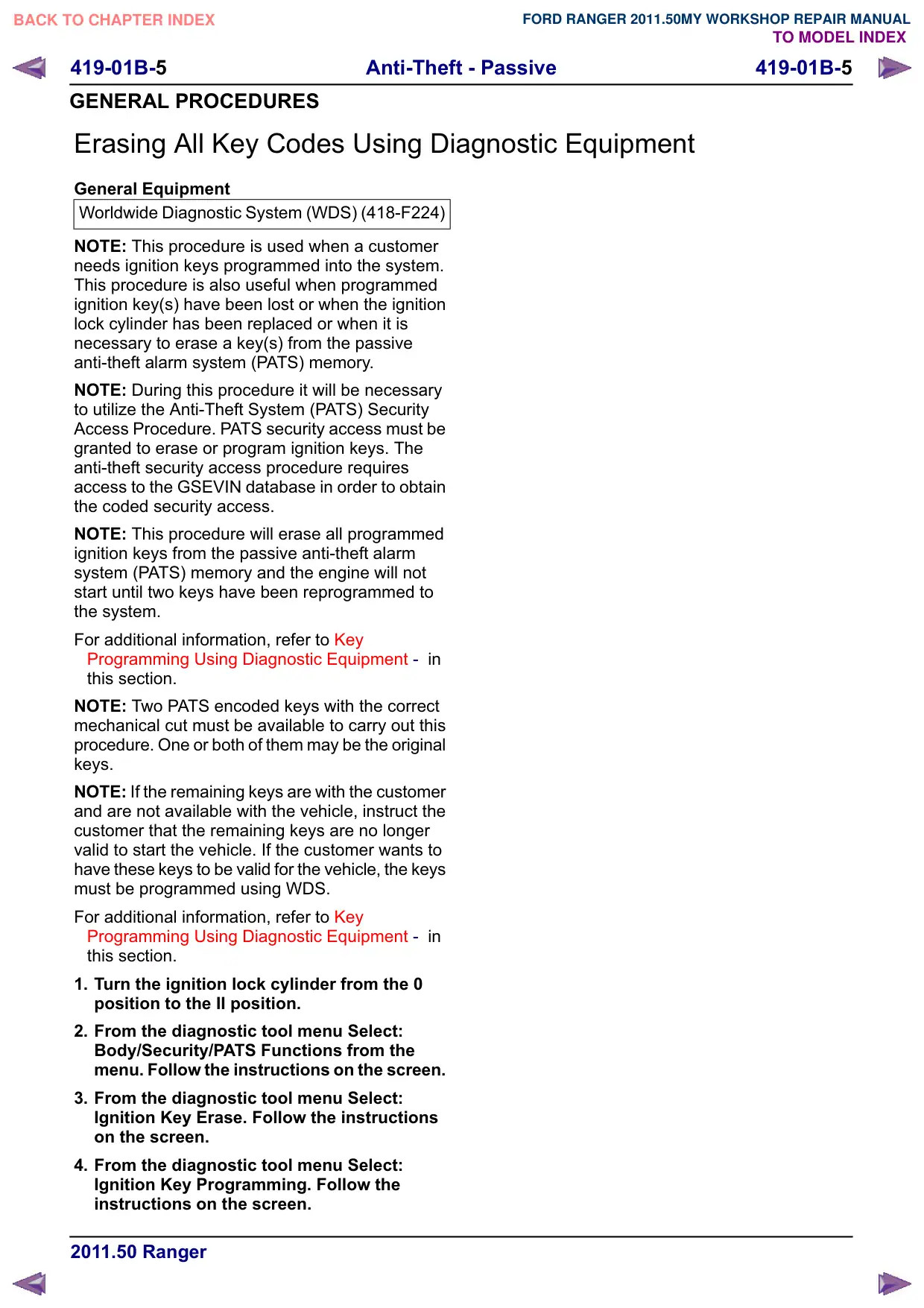
1
Passive anti-theft (PATS) transponder
2
PATS transceiver
PATS
The PATS is a passive system designed to
increase the anti-theft security of the vehicle.
The driver does not need to actively do anything
to protect the vehicle. The PATS is activated
automatically after the ignition is switched off.
The PATS system uses specially encoded keys.
If a valid key is inserted into the ignition lock
cylinder and turned to position II, the code from the
PATS transponder is received by the PATS
transceiver. The code is then sent to the passenger
junction box (PJB) which checks that a correct key
has been inserted and communicates with the
powertrain control module (PCM) to enable the
engine to start.
If the code received by the PATS transceiver does
not agree with any of the codes programmed to
the vehicle, or if errors occur in the PATS, the
engine cannot be started.
To indicate a concern in the PATS, the Vehicle
immobiliser indicator glow in the instrument cluster.
419-01B-3
Anti-Theft - Passive
419-01B-3
GENERAL PROCEDURES
Anti-Theft Security Access
General Equipment
Ford Diagnostic Equipment
NOTE: This procedure requires access to the
Global Secure Vehicle Information System
(GSEVIN) database in order to obtain the coded
security access.
1. From the diagnostic tool menu Select:
Body/Security/PATS Functions. Follow the
instructions on the screen.
General Equipment: Ford Diagnostic Equipment
2.
When installing a new passenger junction
box (PJB), the following sequence must be
completed:
1. Ignition Key Programming.
2. Module Initialization.
3.
When installing a new powertrain control
module (PCM) the following must be
completed:
1. Module Initialization.
419-01B-4
Anti-Theft - Passive
419-01B-4
GENERAL PROCEDURES
Key and Remote Transmitter Programming Using Diagnostic
Equipment
General Equipment
Ford Diagnostic Equipment
NOTE: This procedure requires access to the
Global Secure Vehicle Information System
(GSEVIN) database in order to obtain the coded
security access.
NOTE: This procedure will not erase programmed
ignition keys from the passive anti-theft system
(PATS).
NOTE: A maximum of 8 ignition keys can be
programmed to a vehicle equipped with a passive
anti-theft system (PATS).
1. From the diagnostic tool menu Select:
Body/Security/PATS Functions. Follow the
instructions on the screen.
General Equipment: Ford Diagnostic Equipment
2. From the diagnostic tool menu Select: Ignition
Key Programming. Follow the instructions on
the screen.
419-01B-5
Anti-Theft - Passive
419-01B-5
GENERAL PROCEDURES
Erasing All Key Codes Using Diagnostic Equipment
General Equipment
Worldwide Diagnostic System (WDS) (418-F224)
NOTE: This procedure is used when a customer
needs ignition keys programmed into the system.
This procedure is also useful when programmed
ignition key(s) have been lost or when the ignition
lock cylinder has been replaced or when it is
necessary to erase a key(s) from the passive
anti-theft alarm system (PATS) memory.
NOTE: During this procedure it will be necessary
to utilize the Anti-Theft System (PATS) Security
Access Procedure. PATS security access must be
granted to erase or program ignition keys. The
anti-theft security access procedure requires
access to the GSEVIN database in order to obtain
the coded security access.
NOTE: This procedure will erase all programmed
ignition keys from the passive anti-theft alarm
system (PATS) memory and the engine will not
start until two keys have been reprogrammed to
the system.
For additional information, refer to Key
Programming Using Diagnostic Equipment - in
this section.
NOTE: Two PATS encoded keys with the correct
mechanical cut must be available to carry out this
procedure. One or both of them may be the original
keys.
NOTE: If the remaining keys are with the customer
and are not available with the vehicle, instruct the
customer that the remaining keys are no longer
valid to start the vehicle. If the customer wants to
have these keys to be valid for the vehicle, the keys
must be programmed using WDS.
For additional information, refer to Key
Programming Using Diagnostic Equipment - in
this section.
1. Turn the ignition lock cylinder from the 0
position to the II position.
2. From the diagnostic tool menu Select:
Body/Security/PATS Functions from the
menu. Follow the instructions on the screen.
3. From the diagnostic tool menu Select:
Ignition Key Erase. Follow the instructions
on the screen.
4. From the diagnostic tool menu Select:
Ignition Key Programming. Follow the
instructions on the screen.
419-01B-6
Anti-Theft - Passive
419-01B-6
GENERAL PROCEDURES
Key Programming Using Two Programmed Keys(33 005 0)
NOTE: A maximum of 8 ignition keys can be
programmed to a vehicle equipped with a passive
anti-theft system (PATS).
1. NOTE: This procedure works only if 2 or
more programmed keys are available.
For additional information, refer to: Key and
Remote Transmitter Programming Using
Diagnostic Equipment (419-01 Anti-Theft -
Passive, General Procedures).
2. NOTE: This procedure only works if the
customer spare key programming is enabled.
For additional information, refer to: Key and
Remote Transmitter Programming Using
Diagnostic Equipment (419-01 Anti-Theft -
Passive, General Procedures).
3. Insert the first programmed passive anti-theft
system (PATS) key into the ignition and turn
the key from the OFF position to the ON
position (maintain the key in the ON position
for approximately 3 seconds).
4. Turn the first key to the OFF position and
remove the key from the ignition.
5. Within 10 seconds of turning the key to the
OFF position, insert a second programmed
passive anti-theft system (PATS) key into the
ignition and turn the key from the OFF
position to the ON position (maintain the key
in the ON position for approximately 3
seconds).
6. Turn the second key to the OFF position and
remove the key from the ignition.
7. Within 10 seconds of turning the second key
to the OFF position, insert the new,
unprogrammed passive anti-theft system
(PATS) key into the ignition and turn the key
from the OFF position to the ON position
(maintain the key in the ON position for
approximately 6 seconds).
8. Turn the new key to the OFF position and
remove the key from the ignition.
9. If it is desired to program additional keys,
repeat steps 3 - 9 for each additional key.